HomeshiftDownload on the App Store

Moving inventory for iPhone and iPad

Pack a box, stick a label on it, scan it when you unpack.

You pack a box, photograph what is inside and stick a QR label on it. Three weeks later the tower is standing in the new flat and you are looking for the kettle. Scan the box, see the contents, done.

Free and without an account. Your boxes, photos and lists stay on your device.

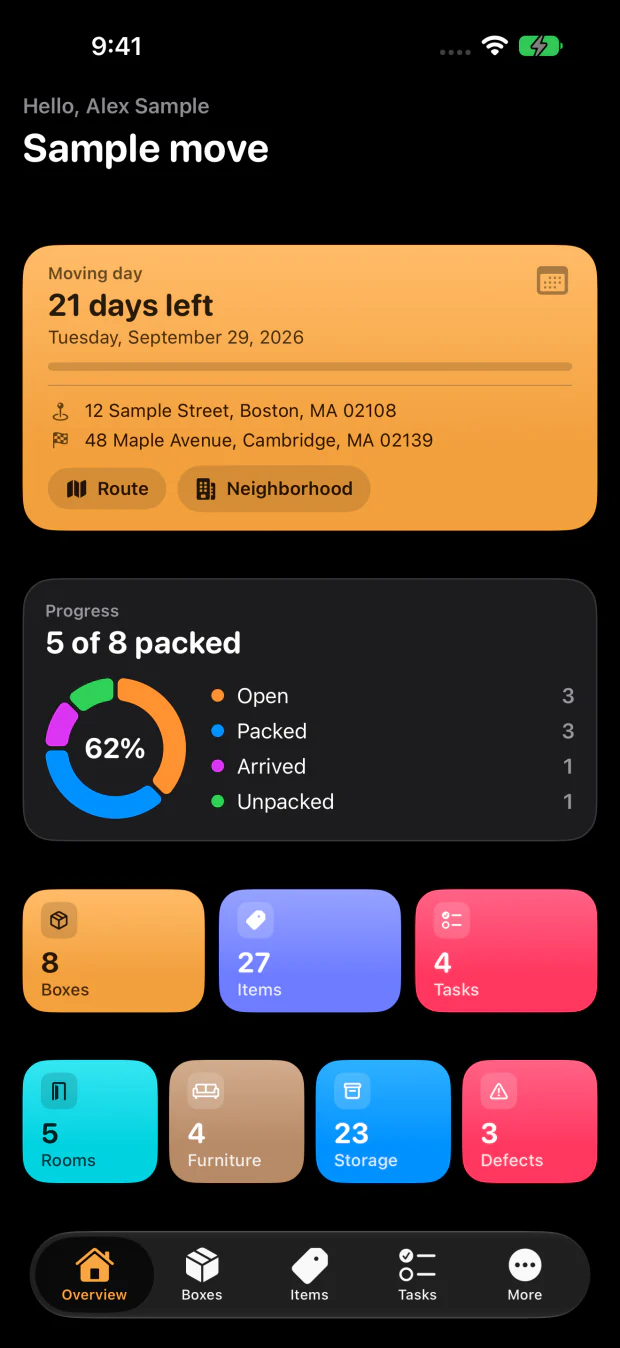
The whole move on one screen

How it works

  1. 1

    Pack and record

    Every box gets a number, a room and its contents. Quick entry understands “4 plates”, the camera recognises items in a photo, and packing suggestions match the room.

  2. 2

    Print labels or stick on stickers

    Print-ready labels with QR code, number and room as a PDF. Or bought QR stickers: the box is created when you scan.

  3. 3

    Scan and find

    One scan with the camera opens the box. Search finds every item and tells you which box it is in.

Homeshift features

Homeshift works locally first: boxes, items and photos live on your device, and the whole app works without an account and without internet. Everything beyond that you switch on yourself.

Every box knows what is inside it

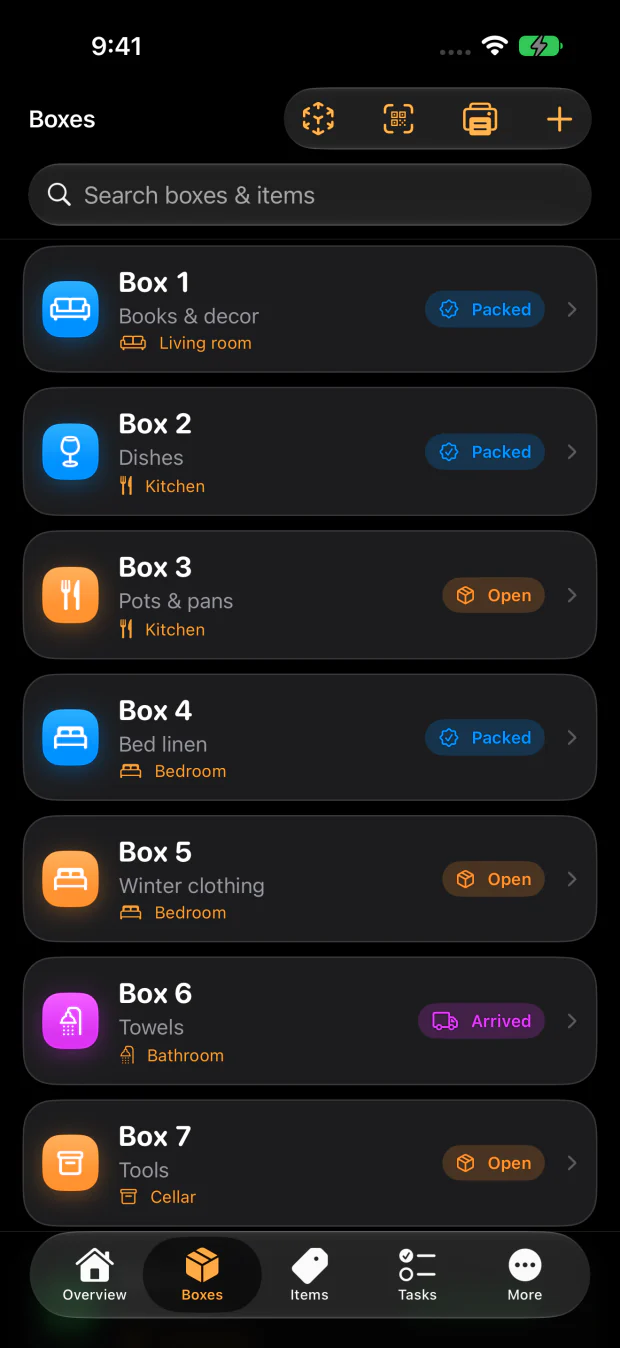
Number, room, status and photos

Every box knows what is inside it

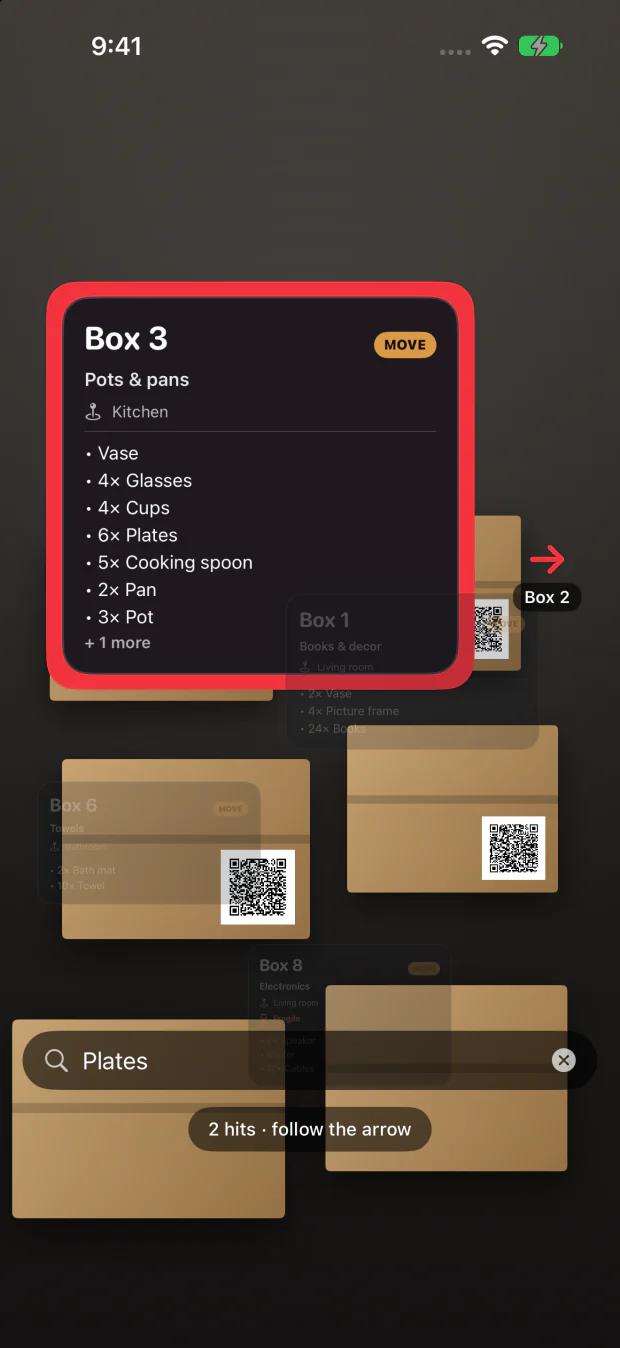
Say what you are looking for

The right box answers

Say what you are looking for

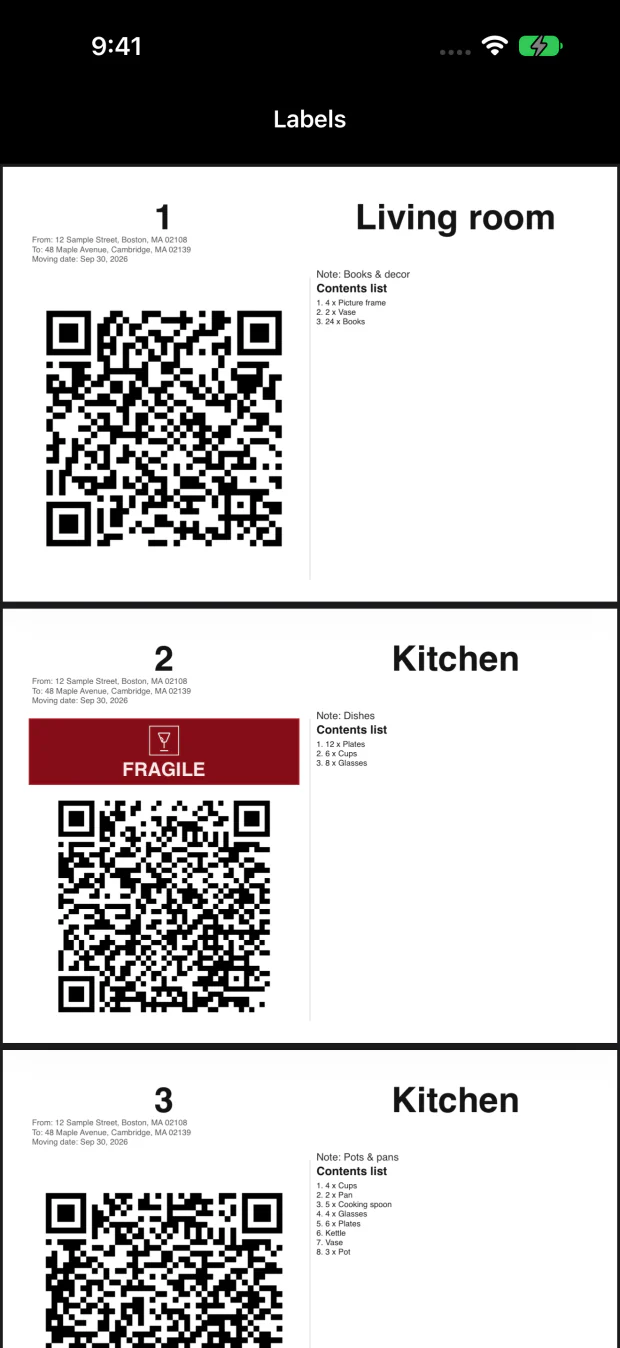
One label, one scan, it is all there

Print ready for the whole move

One label, one scan, it is all there

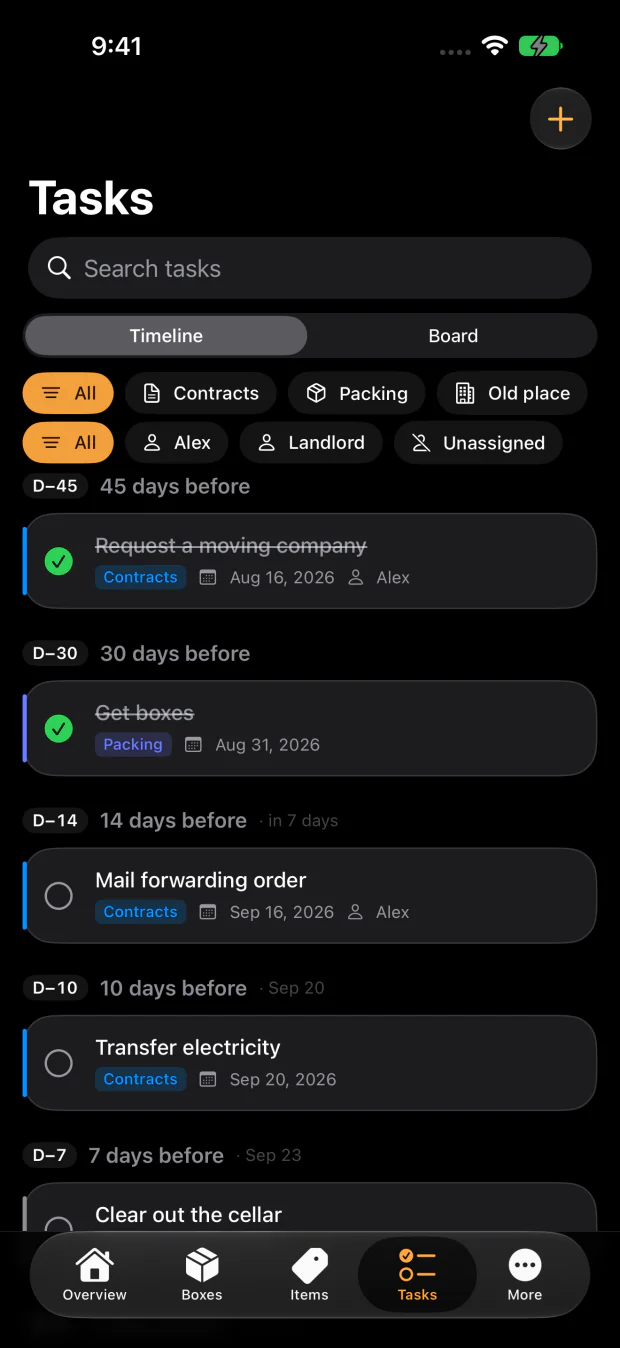
58 tasks lined up with moving day

A new date shifts every due date

58 tasks lined up with moving day

Boxes and rooms

  • Number, title, room and note per box
  • Status from Open through Packed and Arrived to Unpacked
  • Mark as fragile, attach photos
  • Search across all boxes and their contents

Record contents without much typing

  • Quick entry understands quantities: “4 plates” becomes 4x plates
  • Photograph the contents, tap the recognised items, done
  • Scan labels and lettering live with the camera
  • Packing suggestions that match the room
  • Image recognition runs on the device. No photo leaves your iPhone.

QR labels to stick on

  • Print-ready labels with QR code, box number, title and room
  • One scan opens the box right in the app, even from the system camera
  • All labels at once as a PDF, you decide what goes on them
  • Link bought QR stickers: the box is created when you scan

Tasks with a schedule

  • Suggestions for a whole move, sorted by paperwork, packing, old home, new home, moving day and after
  • Due dates hang on moving day: if the date shifts, the task moves with it
  • A date you set yourself stays where you put it
  • Board with Backlog, Active and Done, drag and drop on the iPad
  • Reminders as notifications, dates in your calendar

Not just boxes

  • Furniture list with a fate: take along, sell or dispose of
  • Defects report for the handover, with severity, photos and PDF export
  • Storage for cellar, attic and storage unit, separate from the move and with its own labels
  • AR mode to find boxes in a room
  • Several moves side by side, switched with one tap
  • Activity log: who changed what, and the way back

Move together, if you want to

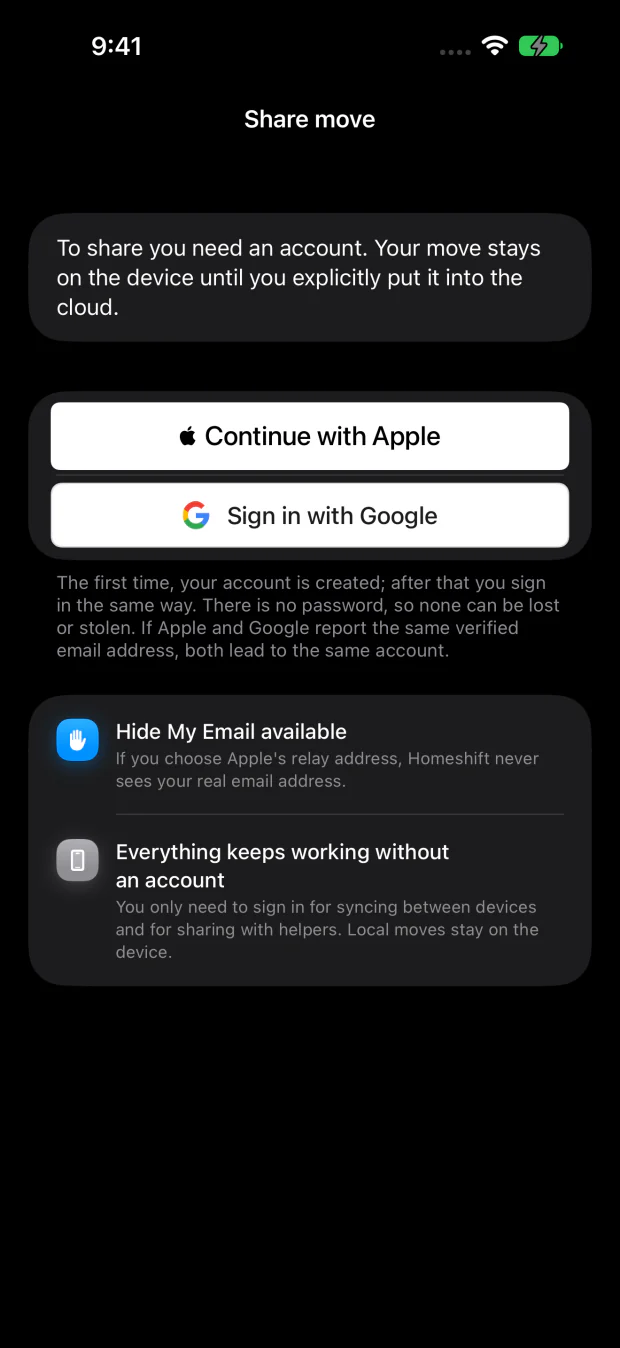
  • Sign in with Apple or Google, put the move into the cloud, invite helpers by link or QR
  • Changes show up on every device while you pack
  • Roles: edit or read only
  • Photos only travel when you flip the switch
  • Stop sharing any time, delete the account any time in the app

On the iPad

  • A sidebar instead of a tab bar, list and detail side by side
  • The same data as on the iPhone

Export and backup

  • PDF manifest, CSV table or JSON archive
  • Optional sync through your own iCloud account, photos included: between your devices, without an account with us
  • Widget with a countdown to moving day and your packing progress

Move together, if you want to

Moving with a partner or friends? Put the move into Homeshift Cloud and invite them with a link or QR code. Changes show up on every device while you pack.

  • Sign in with Apple or Google, no password
  • Roles: edit or read only
  • Photos only travel when you flip the switch
  • Stop sharing any time, delete the account any time in the app
Pack together, both see the same

Pricing: start free, buy once, or cloud on subscription

The app is free and works without an account. Anything beyond that you buy once or by subscription, all through the App Store and without an account with us.

Free

The free version goes a long way for a first move. Where a limit applies, the app says so right there, and nothing you have recorded is ever hidden or deleted.

  • Boxes, items, rooms and photos
  • Print and scan QR labels
  • Export as PDF, CSV and JSON
  • Private iCloud backup
  • The neighbourhood of the new address

Modules: buy once, keep forever

Three modules and a bundle with all three. Paid once, on all your devices, with Family Sharing.

Unlimited
Boxes, photos and storage without limits.
one-time CHF 6.00
Scanning
Scan labels and items, find boxes in AR.
one-time CHF 4.00
Planning
Task plan, reminders, calendar, area.
one-time CHF 4.00
Homeshift Complete
All three modules, one-time purchase.
one-time CHF 8.00

Homeshift Cloud: by subscription

Run one move on several devices and invite helpers. Only the owner of the move needs the subscription; helpers use the app for free. All modules are included.

Homeshift Cloud
CHF 8.00 per month
Homeshift Cloud Year
CHF 49.00 per year

7-day free trial

The subscription renews automatically unless it is cancelled at least 24 hours before the end of the current period. Manage and cancel it in your Apple Account settings.

Prices in Swiss francs. The App Store shows the price in your currency; it may differ by country.

Purchases can be restored on any device with the same Apple ID: Settings → Unlock → Restore Purchases. · Terms of Use (EULA)

Homeshift is distributed through Apple's App Store. Purchases and subscriptions are handled by Apple. Apple's Media Services Terms and the standard Licensed Application End User License Agreement (EULA) apply.

Frequently asked questions

Most questions are answered by the help inside the app, step by step and in your language. For everything else, an e-mail is enough.

Do I need an account?

No. Boxes, items, photos, tasks, furniture, storage and defects all work without an account and without internet. You only need an account if you want to share a move with others.

What does Homeshift cost?

The app is free. The three modules are bought once; Homeshift Cloud for sharing is a subscription with a 7-day trial. Where a free limit applies, the app says so right there; the prices are listed under Pricing and in the app under Settings → Unlock.

Where is my data?

On your device. The private iCloud backup keeps a copy in your own iCloud account, which we cannot access. Only a move you deliberately put into Homeshift Cloud lives on our server, in Europe and with automatic expiry.

How do I share a move?

Settings → This move → Share move. Sign in with Apple or Google, put the move into the cloud and invite people by link or QR code. Helpers do not need a subscription.

I have a new iPhone. How does my data come along?

Three ways: the private iCloud backup (the app fetches it on first launch), a shared move in Homeshift Cloud (Settings → Moves → fetch from the cloud), or the JSON archive from the export, which you import into the new installation.

How do I print labels?

Boxes → menu → Print labels. You choose what goes on the label and get all labels as a PDF. Bought QR stickers are linked to a box by scanning instead.

The QR code does not open the app.

A printed label or a sticker opens Homeshift from the Camera app when the app is installed. Without the app the code leads to this website with the way to the App Store. If the camera stays silent, the scanner inside the app helps: Boxes → Scan.

How do I cancel the subscription?

In your Apple Account settings under Subscriptions, like any other App Store subscription. The cancellation takes effect at the end of the current period; the move's data stays on your device.

How do I delete my account?

Settings → Homeshift account → Delete account. That removes your cloud data and your sign-in identity in one step. The moves on your device stay.

Which languages is Homeshift available in?

Homeshift follows the language of your device. The languages the app speaks are listed on its App Store page.

Is there Homeshift for Android or the Mac?

No. Homeshift is available for iPhone and iPad.

Contact

Write to us in your language. We usually reply within two working days.

Support: [email protected]

Go to Help: step by step through the app

Local first

Homeshift works without an account and without internet. Image recognition runs on the device, no photo leaves your iPhone. No ads, no tracking.

Last updated: 6 September 2026 · Read the privacy policy

The principle: local, unless you want otherwise

Homeshift is an app for your iPhone and iPad. Boxes, items, rooms, tasks, furniture, storage, defects and photos live exclusively on your device by default. No account, no sign-in, and no server of ours ever learns about them.

Everything beyond that you switch on yourself and can switch off again at any time. Homeshift has no advertising, no analytics tools, no tracking and no disclosure to third parties for advertising purposes.

Who is responsible

The controller for data processing is the operator of Homeshift, reachable at [email protected]. A message to that address is all it takes for questions about your data, for a deletion or for questions about this policy.

What stays on the device

Without the cloud switched on, no content leaves your device. That explicitly includes the features that usually wander off into a cloud:

  • Photo recognition, text and label scanning and packing suggestions run entirely on the device. No image and no text is sent anywhere for analysis.
  • The AR mode for finding boxes uses the camera on the device only.
  • QR labels, PDF export, CSV and JSON archives are generated on the device.
  • The activity log (who changed what) is kept on the device; it only goes to the cloud with a shared move.
  • Settings such as reminder times or export preferences live in the local user settings.

Addresses and map

When you enter an address or look at the neighbourhood of the new home, the app queries a map service: Apple Maps (MapKit) with what you type, and for addresses in Switzerland additionally the service of the Federal Office of Topography swisstopo. The privacy terms of those providers apply. The addresses of your move belong to the move and live where it lives: on the device, and in Homeshift Cloud only if you put it there.

From four days before moving day, the app shows the weather for that day. To do this it turns the addresses of your move into coordinates and asks Apple Weather (WeatherKit) with them. Apple gets the place and the day, not your name and not your move. The forecast stays on this device, it does not go into Homeshift Cloud and is fetched again after a few hours.

Private iCloud backup (optional)

You can switch on a backup in your own iCloud account. It is written to your private CloudKit database. We have no access to it, and people helping with a shared move cannot see it either. Apple's privacy policy for iCloud applies.

The backup can be switched off at any time. You remove existing copies like any other iCloud content in the system settings of your device.

Packing suggestions and task templates are fetched from a public CloudKit database. Nothing of yours is transmitted; it is a fetch like that of a web page.

Homeshift Cloud (optional, per move)

If you want to run the same move on several devices or invite helpers, you put exactly that move into Homeshift Cloud. That is a deliberate action per move; all others stay local.

For that you need an account. You can sign in with Apple or with Google, both without a password. The provider sends us a user identifier and, if you agree, your e-mail address and your name. If you choose Apple's relay address, we never learn your real address. If both ways lead to the same confirmed e-mail address, it is the same account. We do not store a password.

The cloud then holds the contents of the shared move: rooms, boxes, items, tasks, furniture, defects, storage, the activity log with the display name of the person who changed something, and, only if you switch on “Share photos”, the photos. Plus the member list of the move and open invitations.

  • Access is enforced on the server per move and membership. Every move stays strictly separate from every other.
  • Invitation links expire, can be revoked and are stored only as a hash, never in plain text.
  • Your sign-in tokens live exclusively in the keychain of your device.
  • Photos are transferred only for the exchange and deleted from the server automatically after 48 hours. Permanently they live on the device and in your private iCloud backup.
  • A cloud copy that has not been changed for 90 days expires by itself; activity log entries are deleted after 90 days. The cloud is a handover point, not an archive.

Who runs the cloud technically

Homeshift Cloud runs on the infrastructure of Cloudflare, Inc. (Workers, D1 database, R2 storage), which provides compute, database and file storage for us as a processor. The data is located in Western Europe. Beyond that we do not pass your data on to anyone, unless we are legally obliged to.

Operating the service produces technically necessary connection data (IP address, time, requested resource). It serves operation and abuse prevention and is not combined into profiles.

When you sign in, the provider you chose, Apple or Google, learns that you are signing in to Homeshift. Apple's or Google's privacy policy applies to that.

This website

homeshift.ch is a static website without accounts, forms or cookies, served through Cloudflare Pages. It produces the same technically necessary connection data as the cloud.

To count visits we use Cloudflare Web Analytics: without cookies, without fingerprinting, without profiles. We see how many people open which page from which country, not who.

Purchases

Purchases and subscriptions are handled by Apple through the App Store. We see neither your payment method nor your billing address. Homeshift only learns from the device which unlock applies. Apple's privacy policy applies to the purchase.

Deleting your data, your rights

You delete local data in the app or by removing it from the device. Without a backup it is then gone for good.

For the cloud there is “Delete account” in the settings. That removes your cloud data and your sign-in identity in one step: shared moves, memberships, invitations and transferred photos. The moves on your device are not affected. After the deletion the app checks with the server instead of merely claiming it.

If you only want to take a shared move back, you stop sharing as its owner: the server copy including photos is deleted, helpers lose access, and the move continues locally.

You have the rights to access, rectification, erasure, restriction and data portability. For portability you do not need to ask us: Homeshift exports your complete data at any time as PDF, CSV or JSON, without an account and without a purchase. You may also lodge a complaint with the competent data protection authority, in Switzerland the Federal Data Protection and Information Commissioner.

Legal bases

The Swiss Federal Act on Data Protection (FADP) applies. Where the European General Data Protection Regulation (GDPR) applies, we process data to perform the contract with you (Art. 6(1)(b) GDPR: account, cloud, purchases), on the basis of our legitimate interest in secure operation (point (f): connection data, abuse prevention) and with your consent (point (a): sharing photos), which you can withdraw at any time.

Children

Homeshift is not aimed at children and does not knowingly collect data from children.

Changes

If what the app does changes, this policy changes with it. The date above says which version applies. We additionally point out material changes in the app.

Moving checklist: what to do when

The tasks Homeshift suggests when you set up a move, as a list to read. In the app they hang on moving day and move with it when the date shifts.

The general list that applies everywhere. For some countries there is a version of its own with the local deadlines and authorities.

By country: Moving in Austria: the checklistMoving in Australia: the checklistMoving in Brazil: the checklistMoving in Canada: the checklistMoving in Switzerland: the checklistCzechiaMoving in Germany: the checklistDenmarkMoving in Spain: the checklistFinlandMoving in France: the checklistMoving in the United Kingdom: the checklistGreeceCroatiaHungaryMoving in Indonesia: the checklistMoving in India: the checklistMoving in Italy: the checklistMoving in Japan: the checklistMoving in South Korea: the checklistMoving in Mexico: the checklistMoving in the Netherlands: the checklistNorwayMoving in Poland: the checklistMoving in Portugal: the checklistRomaniaSwedenSlovakiaThailandMoving in Türkiye: the checklistUkraineMoving in the United States: the checklistMoving in Vietnam: the checklist

55 tasks

Contracts and authorities

  • 17 weeks before
    Check notice periods: flat, parking, internet
  • 14 weeks before
    Give notice on the flat and any extras
  • 13 weeks before
    Arrange viewings for the next tenant
  • 11 weeks before
    Sign the new lease
  • 10 weeks before
    Pay the deposit and first month's rent
  • 9 weeks before
    Arrange the handover date for the old flat
  • 6 weeks before
    Cancel internet and TV contracts
  • 6 weeks before
    Book a van for the cellar and small items
  • 4 weeks before
    Book time off for moving day
  • 3 weeks before
    Draw up the list of address changes
  • 2 weeks before
    Update contents and liability insurance
  • 7 days before
    Cancel the standing order for the old rent

Packing and decluttering

  • 5 weeks before
    Get moving boxes
  • 5 weeks before
    Get packing material
  • 4 weeks before
    Set a decluttering day per room
  • 3 weeks before
    Move the cellar and attic ahead of time
  • 2 weeks before
    Pack seasonal and rarely used things
  • 10 days before
    Pack the workspace
  • 5 days before
    Pack the kitchen, defrost the fridge
  • 2 days before
    Pack the first-night box
  • 2 days before
    Keep the toolbox separate

Old home

  • 9 weeks before
    Declutter: sell, give away, dispose
  • 6 weeks before
    Clear out the cellar and attic
  • 4 weeks before
    Book a bulky waste collection
  • 7 days before
    Factory-reset the smart home devices
  • 1 day before
    Read and photograph the meters
  • 7 days after
    Clean the old place for the handover
  • 10 days after
    Sign the handover protocol, count the keys
  • 4 weeks after
    Track the return of the deposit

New home

  • 9 weeks before
    Key handover and move-in inspection
  • 6 weeks before
    Book the electrician and tradespeople
  • 6 weeks before
    Check mounting points: shower rail, lamps, curtains
  • 4 weeks before
    Order the internet connection
  • 4 weeks before
    Decide what to buy new
  • 2 weeks before
    Draw a furniture plan per room, take measurements
  • 7 days before
    Test the internet connection
  • 1 day after
    Record and report defects on moving in
  • 3 days after
    Label the doorbell and letterbox
  • 7 days after
    Set the smart home up again
  • 7 days after
    Meet the neighbours and the property manager

Moving day

  • 13 weeks before
    Fix the moving date
  • 9 weeks before
    Book the moving company
  • 2 weeks before
    Reserve parking outside both buildings
  • 2 weeks before
    Reserve the lift at both addresses
  • 10 days before
    Arrange care for children and pets
  • 3 days before
    Move the plants separately
  • 3 days before
    Plan bikes and bulky items separately
  • On moving day
    Food and drink for the helpers
  • On moving day
    Final walk-through of the old flat

After the move

  • 3 days after
    Update your address with the residents' registry, where required
  • 7 days after
    Deregister and transfer the electricity contract
  • 7 days after
    Set up mail forwarding
  • 10 days after
    Register for childcare, playgroup or school
  • 2 weeks after
    Tell the bank, employer and insurers
  • 2 weeks after
    Update subscriptions and delivery services

The checklists in this guide are compiled with care, but without guarantee of completeness or currency. Deadlines and responsibilities change. The information of the respective authority or contracting party is authoritative.

In the app: when setting up the move or under Tasks → Template. Everything can be deselected; a template is a suggestion.

Choose a language